
Windows Server 2016 ESU Core Licensing: What Do You Actually Need?
Windows Server 2016 reaches end of support on January 12, 2027. Extended Security Updates can provide additional time, but the requirement is based on cores, not simply on the number of servers.
A Windows Server 2016 inventory is the starting point. To estimate ESU exposure, you also need to understand which workloads will remain, how Windows Server is licensed today, whether Software Assurance or qualifying subscription rights are present, which ESU routes are available and which minimums apply.
Which workloads will remain, which licensing routes are available, and how many cores need ESU coverage?
Windows Server 2016 ESU core licensing basics
Physical-core ESU
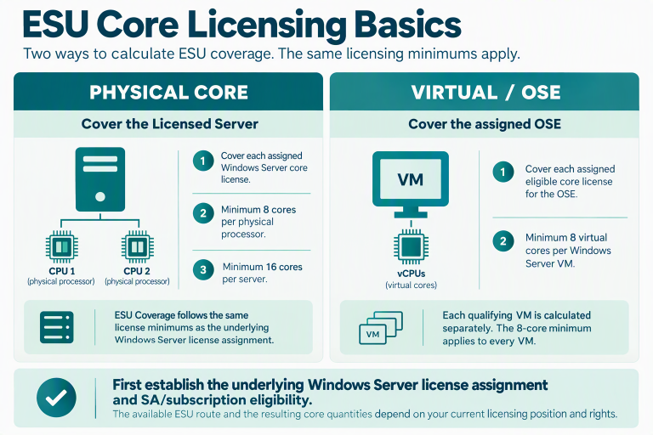
ESU Coverage follows the way Windows Server is licensed today. If the server is licensed by physical cores, ESU must cover the same licensed core quantity and the same minimums apply: at least 8 cores per physical processor and at least 16 cores per server.
With Windows Server Standard, fully licensing the server’s required physical-core capacity covers up to two Windows Server VMs. Each additional set of two VMs requires another full assignment of that same required core capacity. This is commonly called Standard stacking. Datacenter physical-core licensing provides unlimited virtualisation rights on the fully licensed server.
Virtual-core ESU
If Windows Server is eligible to be licensed per VM, ESU follows that VM-based licence assignment. Each qualifying VM is calculated separately, with a minimum of 8 virtual cores per VM. Before comparing this route with physical-core coverage, first check how Windows Server is licensed and whether the required Software Assurance or subscription rights are in place.
Before calculating ESU: understand your Windows Server licensing position
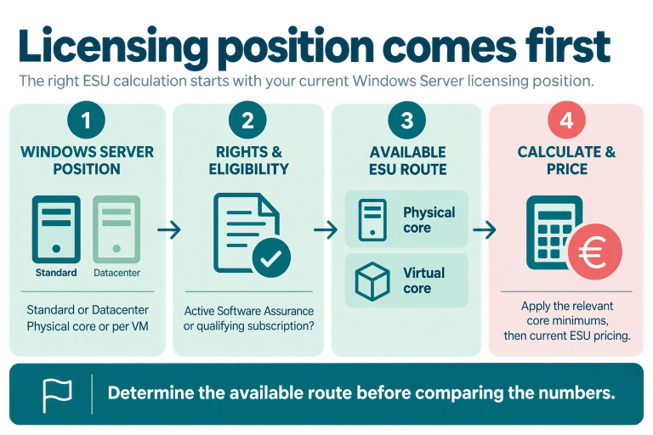
ESU sits on top of the existing Windows Server licensing position. Before comparing physical-core and virtual-core ESU scenarios, first understand how the workloads are licensed today and whether the required rights are present.
For Windows Server 2016 ESU covering on-premises workloads, Microsoft requires active Software Assurance or an equivalent Server Subscription. These rights are also relevant when determining whether the underlying Windows Server per-VM licensing model is available.
1. Windows Server position: Which edition is in use, and is Windows Server licensed by physical core or per VM?
2. Rights and eligibility: Active Software Assurance or a qualifying subscription?
3. Available ESU route: Which ESU route follows from that licensing position?
4. Calculate and price: Apply the relevant core minimums, then current ESU pricing.
Five basics to remember
- One server is not one ESU licence: ESU quantity is expressed in covered cores and provisioned through 2-core and 16-core packs.
- Physical core follows the Windows Server core position: Cover the same licensed physical-core quantity, including the minimum of 8 cores per physical processor and 16 cores per server.
- Virtual core means calculate every VM: Each qualifying VM has its own eight-core minimum.
- With Standard, more VMs can mean licensing the server again: One full assignment of the required server core capacity covers up to two Windows Server VMs. For the next two VMs, the same required core capacity needs to be licensed again.
- Eligibility comes before comparison: Validate Windows Server licensing and SA/subscription eligibility before comparing ESU scenarios.
Example 1: A physical server with 12 cores
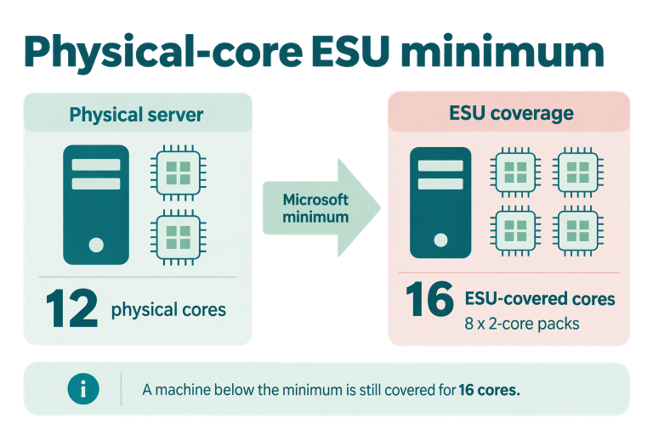
A physical Windows Server 2016 machine has 12 physical cores. Because ESU follows the same Windows Server core minimums, the 16-core per-server minimum applies. The ESU-covered quantity is therefore 16 cores.
Example 2: A small VM with 4 vCores
A qualifying Windows Server 2016 VM has four allocated vCores. The virtual-core minimum applies to that VM individually. A VM with 12 vCores would require 12 covered virtual cores. The virtual-core model follows the actual vCore count once the VM exceeds the eight-core minimum.
Why smaller VMs can create unexpected exposure
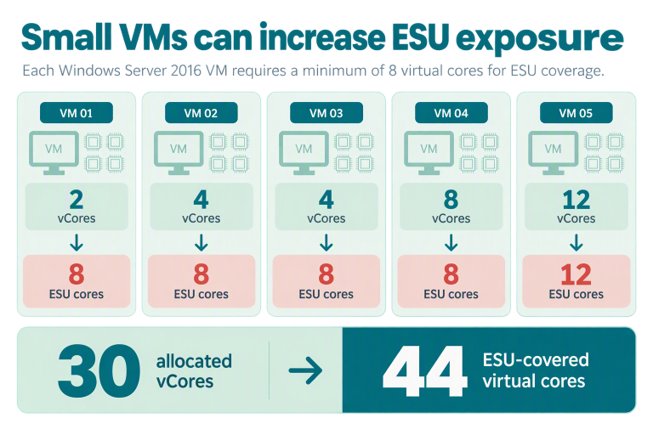
The eight-core minimum applies separately to every VM. So you cannot simply total all allocated vCores first and apply one minimum to the estate. In this example, 30 allocated vCores become 44 ESU-covered virtual cores.
Do you know your actual ESU core exposure?
A raw inventory or vCPU export is not enough. Gidense can reconcile the Windows Server 2016 estate, relate workloads to hosts and clusters, validate the relevant licensing routes and estimate the resulting exposure.
Request an ESU Readiness Assessment | From €2,495 excluding VAT
Example 3: Standard physical core versus virtual core
For a simple comparison, assume one 32-core Windows Server 2016 Standard host with two physical processors of 16 cores each and four Windows Server 2016 Standard VMs with eight vCores each. This example follows Microsoft’s published Azure Arc ESU provisioning guidance for this configuration.
Standard Physical Core ESU
Under the physical-core route, this example results in 32 ESU-covered physical cores, equivalent to 16 two-core packs.
Standard Virtual Core ESU
Under the virtual-core route, calculate each VM separately. Four VMs with eight vCores each result in 32 ESU-covered virtual cores, also equivalent to 16 two-core packs.
Both routes result in the same 32-core quantity in this example, expressed as 16 two-core packs. The licensing route is different, so first understand the existing Windows Server licensing position and applicable SA/subscription rights.

Where does Datacenter fit?
Datacenter Physical Core can be relevant where many applicable Windows Server 2016 VMs run on a covered machine. Datacenter physical-core licensing provides unlimited virtualisation rights on the fully licensed server.
Datacenter Physical Core ESU = cover the assigned physical-core licences, subject to the same applicable Windows Server licence minimums, provides unlimited virtualisation
Datacenter does not automatically produce the lowest cost. Standard and Datacenter have different prices, and only eligible scenarios should be compared.
Clusters require more than a static export
A VMware or Hyper-V export commonly shows where a VM was running when the data was collected. That may not represent the complete licensing scope. A cluster assessment should establish:
• Which hosts each workload can run on
• Physical cores and processor counts by relevant host
• Whether mobility is enabled or restricted
• Allocated vCores per VM
• The available physical-core and per-VM licensing rights
• Software Assurance or subscription eligibility
• Failover and disaster-recovery arrangements
The practical point is that a server count or a snapshot of where each VM happens to run today is not enough to determine the ESU position.
Do not calculate ESU for workloads that will not remain
Only workloads expected to remain on Windows Server 2016 should flow into the confirmed ESU requirement. Microsoft allows core quantities to be changed and licences to be deactivated as systems are upgraded, migrated or retired. This is not automatic; the customer remains responsible for adjusting provisioned coverage.
Looking for the broader Windows Server 2016 ESU picture? Read: Windows Server 2016 ESU, Extended Security Updates, Costs, Licensing & End of Support
Windows Server 2016 ESU Readiness Assessment
Before buying ESU, calculate what you actually need
Gidense combines automated estate analysis with specialist Microsoft licensing review to establish what remains, which licensing routes require consideration, how many cores need coverage and where exposure may be reduced.
The assessment includes:
-
Reconciled Windows Server 2016 inventory
-
Physical and virtual core analysis
-
Host and cluster mapping based on available evidence
-
Validation of Windows Server licensing and relevant ESU routes
-
Indicative ESU-covered core quantities and financial exposure
-
Retirement, upgrade and migration opportunities
-
Specialist review of assumptions and exceptions
INTRODUCTORY PRICING FROM €2,495 EXCLUDING VAT
Important licensing notice
The examples explain Microsoft’s published Windows Server 2016 ESU guidance and general Windows Server licensing principles in practical terms. They do not by themselves establish an organisation’s final licensing or purchasing requirement. The actual Windows Server licensing position, Software Assurance or subscription rights, deployment and infrastructure still need to be validated for each organisation.
Microsoft Product Terms and the customer’s Microsoft agreement take precedence. Pricing and licensing conditions may change.